Clan Logos · 7 min read · Updated November 21, 2026
Best Color Combinations for Gaming Logos and Esports Teams
Strong mascots still fall flat when too many bright colors fight for attention. Explore seven proven gaming HEX palettes and learn how dominant, supporting, and accent tones keep esports branding crisp.
By TheLogoBase Team · [email protected]
1. Understand How Color Shapes Your Gaming Logo
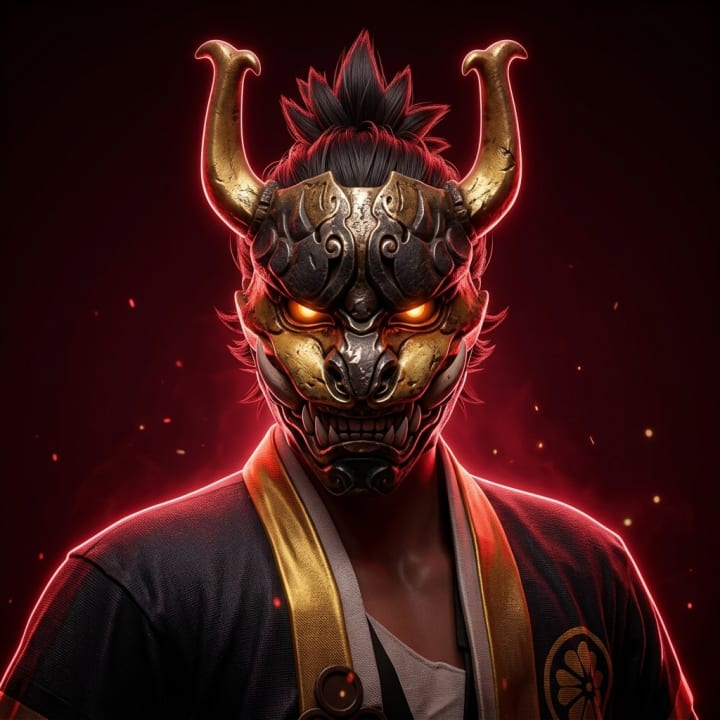
Even sharp mascot linework and bold clan fonts feel amateurish when five saturated colors compete across the frame. Players often pick bright shades one by one because each swatch looks cool alone—only to watch them clash once layered onto armor, flames, and lettering.
Build every palette around three clear roles instead: one dominant color that anchors your team identity, one deep supporting shade (like obsidian black, midnight navy, or charcoal) to hold contrast, and one focused accent color saved for eyes, borders, and key highlights. Red on black communicates fierce aggression, cobalt and silver read tactical and futuristic, and purple on dark slate feels sleek and mysterious—always pairing the hue with your mascot’s attitude.
2. Seven Proven Gaming Color Palettes (With HEX Codes)
Using consistent HEX codes keeps your Discord server icon, YouTube avatar, banner, and squad player cards looking unified instead of slightly mismatched across every upload. Treat each three-color stack below as a dominant–base–accent system rather than coloring every detail equally:
- Crimson Red (#DC2626), Deep Black (#111111) & Metallic Silver (#C0C0C0): Classic aggressive tournament stack—black holds the backdrop while silver crisps up text strokes and edges.
- Electric Blue (#168BFF), Deep Navy (#101B35) & Ice White (#F5F7FA): Sharp futuristic identity where deep navy anchors the glow and bright white keeps clan tags unmistakable.
- Deep Purple (#6425A8), Obsidian (#101010) & Neon Pink (#FF3CAC): High-energy streamer and anime aesthetic—keep neon pink strictly on rim highlights or eye glints.
- Emerald Green (#00A86B), Charcoal (#202426) & Silver (#B8C2CC): Tactical, sniper, and stealth-squad feel that stands out cleanly without blinding neon glare.
- Burnt Orange (#E87524), Dark Espresso (#261810) & Warm Cream (#F5E6C8): Bold alternative to standard red-and-black that makes beast mascots and illustrated shields pop.
- Ice Cyan (#9BE7FF), Steel Blue (#526D82) & Midnight Navy (#0B1426): Frosty cyber look ideal for sleek armor highlights against deep dark backdrops.
- Championship Gold (#D4AF37), Jet Black (#111111) & Deep Maroon (#4A101B): Refined prestige crest—apply gold sparingly along crowns, rims, and primary letters so it feels sharp rather than busy.
3. Balance Colors Across Mascots, Typography, and Backdrops
A solid three-color stack still breaks down if every layer receives equal brightness. Keep backgrounds quiet and dark whenever your character wears vivid armor or flames; conversely, if your mascot relies on dark shadow tones, frame it with bright rim highlights so its silhouette never disappears into charcoal Discord sidebars.
Apply the exact same restraint to team typography. Keep your IGN or clan name in one clean fill color backed by a thick dark contrast stroke so letters never blur over glowing chest plates. Inside TheLogoBase Studio Editor (/editor), you can test custom lettering directly on HTML5 Canvas with curved text paths, dark contrast strokes, controlled neon outer glow, crest badges, and watermark-free 1080p (1K) or 2048px (2K) PNG exports.
- Avoid coloring alternate letters in different neon shades—uniform lettering always reads faster.
- Switch off outer glow temporarily while designing; if text and mascot lack separation without glow, sharpen the base contrast first.
- Reserve your brightest accent color strictly for eyes, blade edges, or clan subtitles.
4. Test Palette Contrast at Avatar Size Before Exporting
Two shades that look distinct on a full monitor often melt into one muddy patch once shrunk inside mobile chat avatars or tournament brackets. Always inspect your emblem down around 32 px, 48 px, and 64 px—and glance at it over both dark mode UI and white light-mode interfaces—before finalizing.
On TheLogoBase, finished square crests download at 2048 × 2048 px (2K) 1:1 JPG on dark backdrops for instant Discord, Steam, and YouTube setups. Whenever you plan to layer your emblem over custom banners or stream scenes, remember JPG flattens the background—use Studio Editor (/editor) and its local Remove BG export for an alpha-channel Transparent PNG instead.
- Shrink your logo preview to 32–64 px to ensure foreground and background do not blend together.
- Verify readability inside both midnight-dark Discord sidebars and bright white comment threads.
- Lock the exact same HEX colors into Gamer Card Maker (/card) so player passes match your clan logo.
Gaming Color Palette Quick Reference
| Setting | Recommended | Why It Matters |
|---|---|---|
| Color Budget | 2–3 Core Hues | One dominant shade, one dark anchor, and one focused highlight accent. |
| Consistency Standard | Exact HEX Codes | Keeps Discord avatars, YouTube banners, and player cards visually matched. |
| Typography Contrast | Solid Fill + Dark Stroke | Separates IGN and clan lettering cleanly over detailed armor. |
| Gallery Master Size | 2048 × 2048 px (2K, 1:1) | Direct 2K JPG on dark backdrop, or 1080p / 2048px PNG inside /editor. |
| Mobile Legibility Check | 32 – 64 px Preview | Confirms silhouette and highlights hold separation at tiny UI sizes. |